


Drone App: Forecast for UAV
4.387.00 Reviews
App Specs
- Version
- 2.2.0
- Updated On
- License
- Free
- Downloads
- 1,000,000+
- Developer
- Go Dreams
- Categories
- Weather
- Platform
- Android, iOS
Screenshots
 Analysis by AppCompare
I tend to check the sky before deciding whether to take a drone out, and that is the practical problem Drone App: Forecast for UAV is meant to help with. It is a weather app aimed at quadcopter pilots, not a general forecast app with a drone label pasted on. I’d treat it as a planning aid: useful for deciding when to go, while still leaving the final safety and airspace checks to me.
A useful weather check, not a flight guarantee
Weather can change the feel of a flight quickly. Wind that seems manageable at takeoff may be less comfortable on the return, while rain or shifting conditions can turn a planned outing into a poor choice. A drone-focused forecast is valuable because it puts those questions in the context of flying rather than simply telling me whether to bring a jacket.
That distinction matters for trust. A forecast can inform a decision, but it cannot promise that conditions at a particular launch point will match what I see on screen. I would check the sky and surroundings in person, leave room for local variation, and avoid treating any single app as permission to fly. For a beginner, that cautious habit is more important than finding a perfect-looking forecast screen.
Who will get the most out of it
I can see this fitting hobby pilots who often have to decide whether a short window is worth using, as well as photographers who want to plan around conditions before carrying their gear to a location. It is especially useful when the question is not just “Will it rain?” but “Does the forecast look suitable enough for the kind of flight I have in mind?”
It is less compelling if I fly only occasionally in a familiar, open area and already check weather through a source I trust. It is also not a replacement for learning local drone rules, checking the aircraft manufacturer’s guidance, or making a conservative call when conditions feel marginal. Pilots who want a full flight-planning or aircraft-control tool should not assume a weather app covers those separate jobs.
A practical routine before leaving home
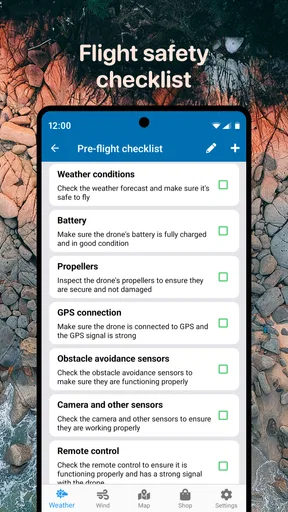
My most useful approach would be to check the forecast before packing, then look again closer to departure. If the first check suggests a promising window, I can prepare the drone without committing to launch; the second check helps me decide whether the trip still makes sense. At the site, I would compare the forecast with what I can actually observe and be ready to postpone rather than trying to salvage a plan.
A small but useful trade-off is that a detailed forecast can encourage overconfidence. Wind information is helpful, but a number or direction on a screen does not account for every obstruction, open field, or gust around a building. I would use it to narrow down a time and place, not to justify flying beyond my comfort level. That makes the app more useful as part of a routine than as a last-second go-ahead.
Worth Reading Before You Choose

Flipboard Shows What News Apps Must Do Beyond the Feed

Switching to Android Auto Means Rethinking Your Driving Routine

Google Calendar Makes a Crowded Week Easier to Manage

Ludo King Makes the Most of the Minutes Between Plans

Baby Panda World Brings Quick Play to Modern Phones, but Its Game Library Feels Busy

ESPN’s Live Game View Makes Following Close Games Easier
The usual alternative is a general weather app, which may be perfectly adequate for broad rain and temperature checks. The advantage of a tool built around UAV use is its relevance to pilot decisions; the disadvantage is that I still need other sources for broader planning, regulations, and conditions on the ground. I would keep a familiar general forecast available rather than expecting one app to answer every question about a flight.
For a realistic example, imagine I have a free afternoon and want to take landscape photos at a spot I have not visited recently. I would check conditions before driving, use the forecast to decide whether the outing is promising, then reassess when I arrive. If the local wind feels stronger than expected, I would pack up even if the forecast looked acceptable. That extra judgment is not a flaw in the app; it is part of responsible flying.
Why Weather Matters for Drone Enthusiasts
Before diving into the nitty-gritty of the app, let's talk about why weather forecasting is crucial for drone pilots. You see, drones are pretty sensitive to weather changes. A sudden gust of wind or unexpected rain can easily ruin your flight plan, not to mention your expensive drone! That's where Drone App: Forecast for UAV steps in, offering detailed weather insights tailored specifically for drone flying.
Features That Make It a Must-Have
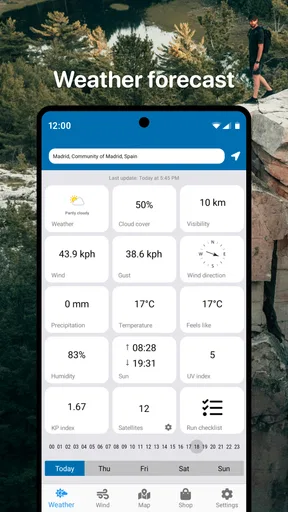
First off, the app provides real-time weather updates. Imagine planning a perfect aerial shot, only to have it spoiled by unexpected weather changes. With this app, you get up-to-the-minute weather data, ensuring you're always in the loop. The app's intuitive interface makes it super easy to navigate, even if you're not a tech whiz.
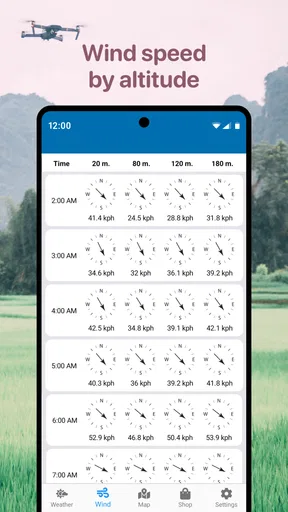
One of my favorite features is the wind speed and direction forecast. As any seasoned drone pilot knows, wind can be your worst enemy. The app gives you a detailed breakdown of wind patterns over the next few hours, helping you plan the perfect flight window.
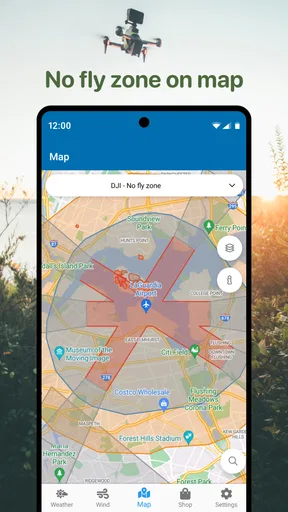
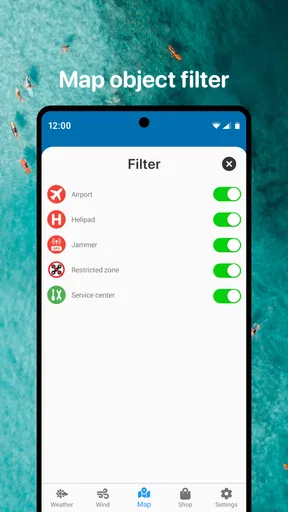
But wait, there's more! The app also includes a no-fly zone map. This is a lifesaver, especially if you're flying in unfamiliar territories. It highlights restricted areas, ensuring you stay on the right side of the law and keep your drone safe.
Reading the map with care
A restricted-area map is helpful, but I would use it as a prompt to check the rules that apply to my exact location, not as the final word on whether a flight is allowed. Boundaries and requirements can depend on where I am and what I plan to do, so checking official local guidance remains part of my preflight routine. The map is most valuable when it makes me pause and investigate an unfamiliar place before I launch.
That is also where a dedicated drone tool differs from a standard weather app: it brings flight-relevant context together, but it does not remove the need for a pilot’s own judgment. When I travel, I would check the destination and its restrictions before setting out, rather than waiting until I have the drone unpacked. That saves time and avoids turning a promising forecast into a wasted trip.
User Experience – Simplicity Meets Functionality
Now, let's talk about user experience. The app's design is sleek and user-friendly. You don't need to be a tech guru to figure it out. Everything is laid out logically, so you can access the information you need without fuss. The developers clearly put a lot of thought into making the app accessible for everyone.
Another neat aspect is the customizable alerts. You can set up notifications for specific weather conditions, like strong winds or rain, ensuring you're always prepared. It's like having a personal assistant keeping tabs on the sky for you.
Choices, checks, and everyday friction
Alerts are most useful when I choose thresholds that match my own cautious limits and the aircraft I intend to fly. I would not leave them as a substitute for checking before takeoff: a notification can help me notice a change, but it cannot assess what is happening at the launch site. If alerts become distracting, I would keep only the ones that help with a real decision, such as whether to reconsider a planned outing.
For a data-conscious user, the sensible approach is to review the permissions and choices shown by the app on the device before granting access. I would allow only what seems necessary for the way I plan to use it and revisit those choices if my needs change. That is a general precaution, not a claim about a particular permission or data practice. It keeps control with me without assuming details that are not visible in the app experience.
The practical questions are straightforward: can I use it as my only source for deciding whether to fly? I would not; I would combine its forecast with local observation and the applicable flight rules. Is it useful to a new pilot? Yes, as a weather-planning companion, provided the pilot does not mistake a forecast for training or legal guidance. And if I prefer a broader weather overview, a conventional forecast app may be a better everyday choice, with this one serving the specific drone-planning role.
Enhancing Your Drone Flying Experience
With Drone App: Forecast for UAV, every flight becomes an opportunity for a perfect shot. Whether you're a professional photographer or just flying for fun, the app ensures you have all the data you need for a successful flight. It's not just about avoiding bad weather; it's about optimizing your flying conditions to get the best results every time.
The app also fosters a community of drone enthusiasts. You can share your experiences, tips, and even favorite flying spots with fellow users. This social aspect adds a layer of fun and engagement, making it more than just a utility app.
That community element may appeal if I enjoy exchanging ideas with other pilots, but it is not essential to the core weather-checking routine. I would think carefully before sharing a favorite location: a spot that is convenient for one person may have access rules or restrictions that make it unsuitable for another. Keeping location details private unless I am comfortable sharing them is a simple way to stay deliberate about participation.
Cost, compatibility, and a measured verdict
The app is free to download, with optional in-app purchases listed from $2.49 to $24.99 per item. I would start with the free experience and decide whether any paid option addresses a real need, rather than paying just because I fly a drone. It is rated for Everyone, works on Android 6.0 and above, and the current version is 1.5.9. Those details make it accessible to many Android users, though I would still check that my device runs it comfortably.
Go Dreams is the developer, and the app has a 4.2 average from around 32,000 ratings, with over a million installs. Those figures suggest that it has found an audience among drone users, but popularity alone is not a reason to trust a forecast blindly. I would judge it by whether the information is clear enough to support my decisions and whether its controls feel appropriate for my own use.
Final Thoughts – Is It Worth It?
So, is Drone App: Forecast for UAV worth downloading? Absolutely! It transforms your drone flying experience from a hit-or-miss affair into a well-planned activity. The combination of accurate forecasts, user-friendly design, and community features make it a standout choice for drone pilots.
Whether you're dodging rain clouds or seeking the perfect sunset shot, this app has you covered. So go ahead, give it a try, and take your drone adventures to new heights!
My recommendation is a little more cautious: I see it as a potentially handy companion for pilots who want weather and flight-area context in one place, not as an authority that can certify a safe or legal flight. If you are comfortable checking conditions, reviewing the app’s visible choices, and making the final call yourself, it is worth trying. If you want one tool to handle forecasting, regulations, and every on-site judgment, this is not the right expectation to bring to it.
Pros
- Accurate weather predictions for drone flights.
- User-friendly interface with easy navigation.
- Real-time alerts for sudden weather changes.
- Customizable settings for specific drone models.
- Integrated map with no-fly zone indicators.
Cons
- Limited offline functionality for remote areas.
- Some features require a subscription.
- Occasional lag in data updates.
- Requires a stable internet connection.
- Battery consumption is relatively high.
FAQs for Drone App: Forecast for UAV
What features does the Drone App: Forecast for UAV offer?
The Drone App: Forecast for UAV provides real-time weather updates, wind speed, direction details, and comprehensive flight conditions. It also offers location-based forecasts, customizable alerts, and integrates seamlessly with popular drone models. These features ensure safe and well-informed drone operations.
How accurate are the weather predictions in the Drone App?
The app uses advanced meteorological data from reliable sources to deliver highly accurate weather forecasts. It updates frequently to provide real-time information, ensuring users have the most current conditions for their flight planning. However, always cross-check with local weather updates for maximum accuracy.
Is the app compatible with all drone models?
The Drone App: Forecast for UAV is compatible with most popular drone models, including those from DJI, Parrot, and Yuneec. However, it's always a good idea to check the app's compatibility list on our website or the app store description to ensure it supports your specific drone model.
Does the Drone App require internet access to function?
Yes, the Drone App requires an internet connection to provide real-time weather data and updates. While some features may be available offline, such as previously downloaded forecasts, real-time updates and alerts necessitate an active internet connection for accurate and up-to-date information.
Are there any in-app purchases or subscriptions required?
The Drone App offers a free version with basic features, while advanced functionalities, such as detailed forecasts and customized alerts, may require a subscription. These subscriptions help maintain the app's high-quality service and ensure users receive the most accurate and comprehensive data available.


